
 Delivery· Your restaurant’s own Deliverect account
Uber Eats, DoorDash and SkipTheDishes in one POS
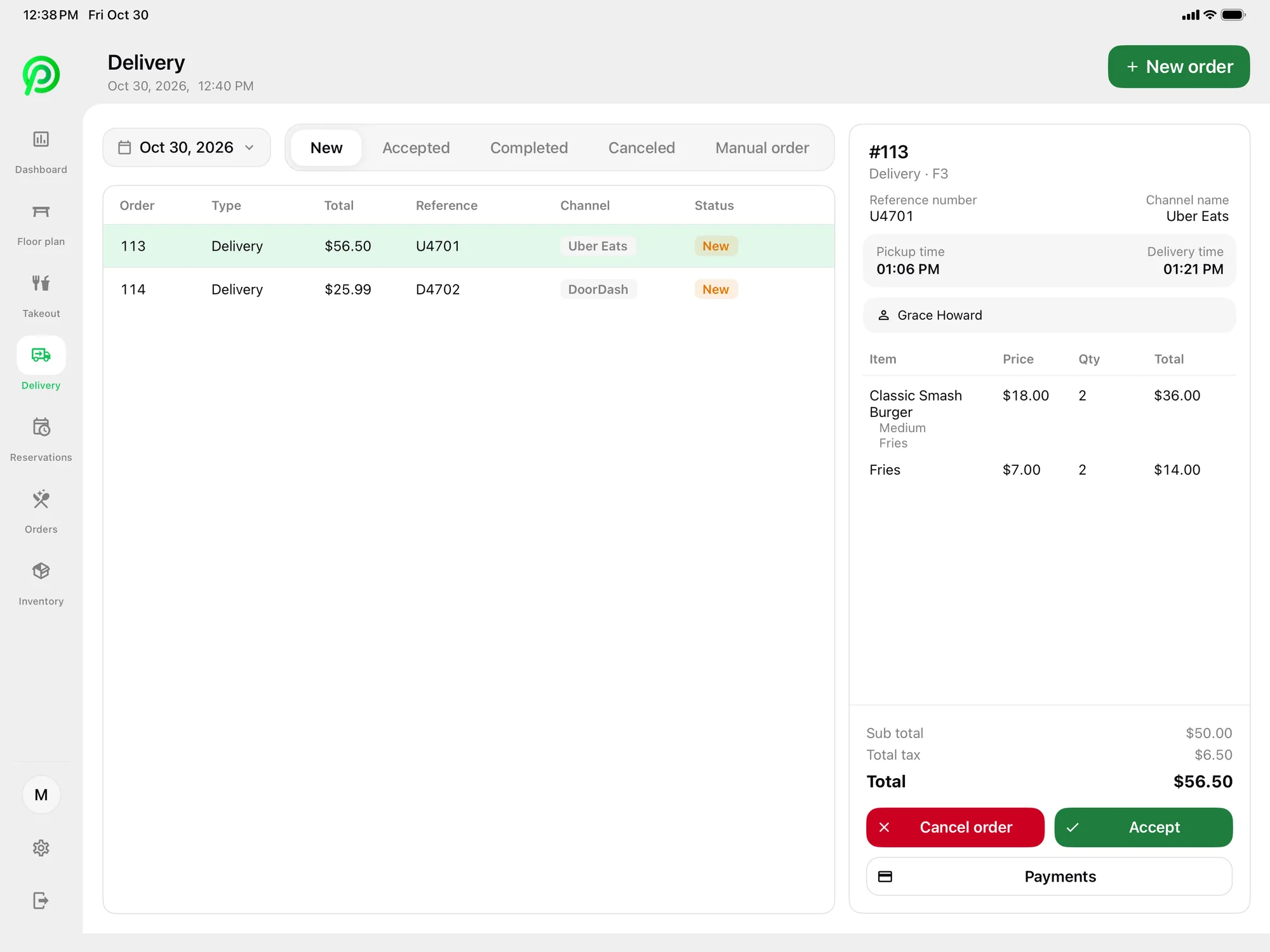
Deliverect is how delivery app orders reach Platter today. Connect your restaurant’s own Deliverect account and orders from Uber Eats, DoorDash and SkipTheDishes arrive in Platter, ready for your team to accept or cancel.
How it works
- Step 1
Open a Deliverect account
Your restaurant uses its own Deliverect account, linked to the delivery apps you sell on.
- Step 2
Connect Deliverect to Platter
Link Deliverect with your Platter account so delivery orders flow into the POS.
- Step 3
Handle orders in one list
Uber Eats, DoorDash and SkipTheDishes orders appear in Platter to accept or cancel.
- Step 4
Kitchen and reports take it from there
Accepted orders go to the KDS or kitchen printer, and sales show up under delivery in your reports.
Three apps, one screen
Stop switching between tablets. Orders from all three delivery apps arrive in Platter.
Same kitchen workflow
Delivery tickets show on the KDS with modifiers, allergy notes and a timer, like every other order.
Delivery set up your way
Set delivery prices separate from dine-in and takeout, and run discounts for the delivery channel.
If you sell on more than one delivery app, Deliverect gathers those orders, and Platter shows them in your POS so staff don’t juggle a tablet for each app.
Your restaurant keeps its own Deliverect account. Once it’s connected, orders from Uber Eats, DoorDash and SkipTheDishes arrive in Platter for your team to accept or cancel.
Accepted orders go straight into the kitchen workflow. Tickets move from New to Preparing to Ready to Served on the Kitchen Display System, and kitchen profiles keep each station focused on its own items.
Direct Uber Eats and DoorDash integrations are planned, but Deliverect is how delivery orders reach Platter today. Delivery is included in the Pro plan at $149 CAD per location per month.
In the back office, you can set delivery prices separate from dine-in and takeout and run discounts for the delivery channel. Reports break out delivery sales from dine-in and takeout for any date range, with CSV export, so you can see what each channel brings in.
Related features: Delivery App Orders, Order Management, Kitchen Display System, Takeout Management.
Deliverect and Platter: questions
See your restaurant running on Platter
A 30-minute demo with a product specialist, tailored to your menu and floor. No obligation.
Book a free demo