
Delivery· Connected through Deliverect
Uber Eats orders in your POS, not on another tablet
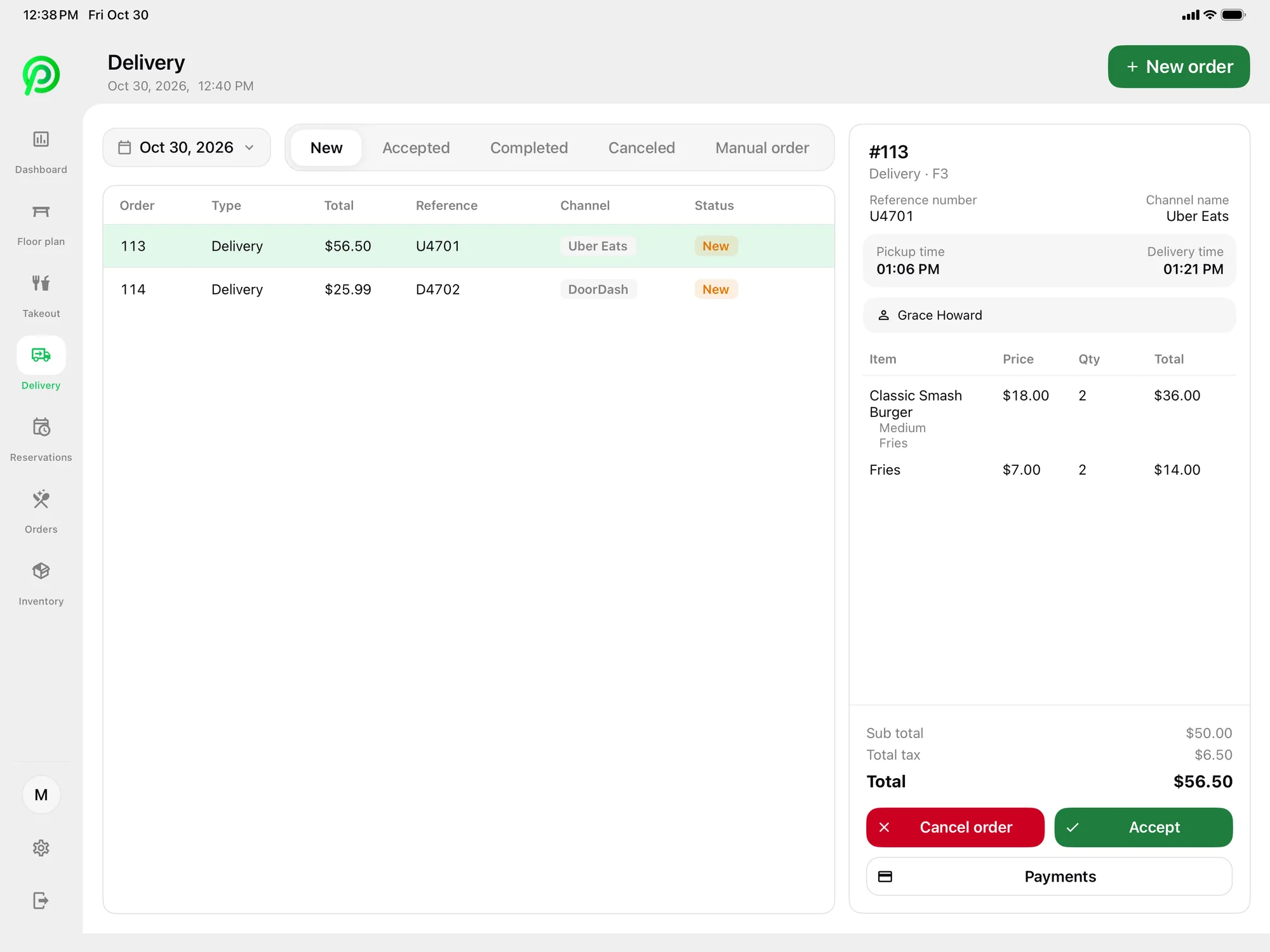
With Platter, Uber Eats orders arrive in the POS through Deliverect, using your restaurant’s own Deliverect account. Your team accepts or cancels each order on the same screen they use for dine-in and takeout, and the kitchen sees it with everything else.
How it works
- Step 1
Set up your Deliverect account
Uber Eats connects to Platter through Deliverect. You’ll need your own Deliverect account linked to your Uber Eats store.
- Step 2
Connect Deliverect to Platter
Once Deliverect is linked, Uber Eats orders start arriving in Platter’s delivery list.
- Step 3
Accept or cancel in Platter
Staff review each Uber Eats order in Platter and accept or cancel it from the same device they use for every other order.
- Step 4
Send it to the kitchen
Accepted orders go to your Kitchen Display System or Epson kitchen printer, routed to the right station by category.
One place for every order
Uber Eats orders sit beside dine-in, pickup, curbside and phone orders, so nobody has to watch a separate tablet.
The kitchen sees it straight away
On the KDS, delivery tickets move from New to Preparing to Ready, with a timer and modifiers on every ticket.
Delivery prices and reports
Set separate delivery prices in the back office and see delivery sales broken out in your reports.
If you sell on Uber Eats, Platter brings those orders into your POS through Deliverect, so you can stop re-keying tickets from a separate device.
To use it, your restaurant needs its own Deliverect account connected to your Uber Eats store. Platter does not offer a direct Uber Eats connection today. A direct integration is planned but not available yet. Delivery is part of the Pro plan at $149 CAD per location per month.
When an order comes in, your team accepts or cancels it in Platter. Accepted orders reach the kitchen the same way dine-in orders do. With a kitchen profile per station, the bar only sees drinks and the line only sees food.
Platter’s back office lets you set delivery prices separate from dine-in and takeout, and run promotions by channel. Sales by dine-in, takeout and delivery appear on the POS dashboard, so you can see how much of your business comes from delivery apps. Kitchen tickets show modifiers and allergy notes on every item, and a timer on every ticket.
Related features: Delivery App Orders, Order Management, Kitchen Display System, Reports.
Uber Eats and Platter: questions
See your restaurant running on Platter
A 30-minute demo with a product specialist, tailored to your menu and floor. No obligation.
Book a free demo